











This page explains how to download and install the PrideSpins app on an Android phone in Ghana. It covers where the file comes from, what happens after the APK lands on your device, how the installation prompt works on different handsets, and how to open your account once the app is on the home screen.
Nothing on this page asks you to create a new profile. If you already play through the mobile site, the same login details can be used inside the app after installation. Betting and casino play are for adults only, 18+.
PrideSpins App in Ghana
The PrideSpins app provides a mobile route into an account you already have. Instead of opening a browser and entering the site address each time, you tap the installed icon and use the service from your phone.

The layout is designed for a small touchscreen, with controls reached by tapping rather than using a mouse. A phone with an unstable connection may still need extra time to load pages, so wait for each screen to finish before tapping again. The Aviator game page can also be opened from a supported mobile device.
Installing the app does not create a second account or move your profile to the phone. Account information is held by the service, while the app provides another way to access it. Keep your login details private and avoid saving them on a shared handset.
How to Download the PrideSpins App for Android
Start from the official PrideSpins source rather than a third-party file directory. Open the site in the mobile browser on the phone where you want the app, so the file is saved locally and does not need to be transferred between devices.
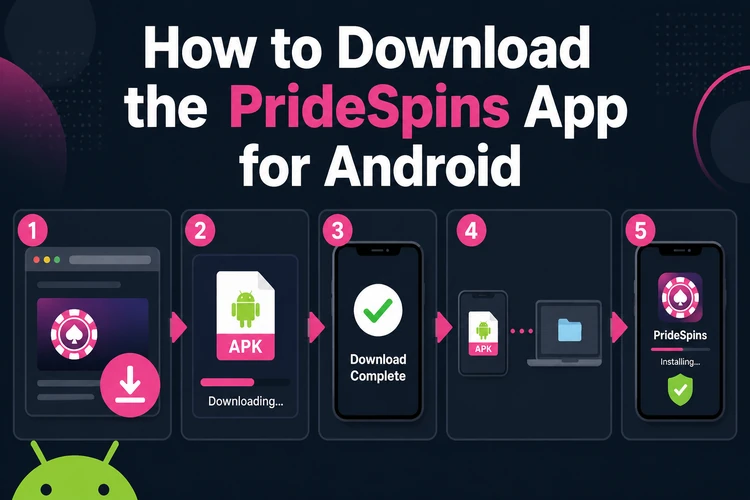
The download may require confirmation in the browser before the file is saved. Use a reliable connection where possible, and do not close the browser while the download is in progress.
- Open the official PrideSpins site in your phone browser.
- Find the Android download option on the page.
- Tap it and confirm the download if the browser asks.
- Wait until the file is fully saved, not paused partway through.
- Open the saved file from the notification shade or Downloads folder.
- Follow the Android installation prompt through to the end.
- Launch the app from the home screen or app drawer.
What the APK File Is
An APK is the package format Android uses to install applications. After the app download is complete, the APK is a file in the phone's storage, not a working app yet. Opening that file starts the Android installer.
Because an APK can be copied and re-uploaded by anyone, its source matters more than its file name. Get the file from the official site or a source the operator confirms, and avoid catalogues that repackage installers. Modified, cracked and mod builds should not be installed: an altered file may behave differently from the original and may expose your device or account to unnecessary risk.
Do not rename an incomplete download or try to install it while the browser still shows progress. If Android reports that the file cannot be opened, delete the incomplete copy and download it again from the confirmed source.
How to Install the PrideSpins APK
The sequence is short: download the file, open it, allow the permission Android asks for, install, then launch. The permission prompt can be confusing because its wording is not the same on every phone.
On some devices, the prompt applies to the browser used for the download. On others, Android sends you to a settings screen where you must enable installation permission before returning to the file. Samsung, Xiaomi, Tecno and Infinix may use different labels, so follow the instruction shown on your own screen.
- Step 1: Open the downloaded file from the notification or Downloads folder.
- Step 2: Accept the permission request Android shows for installing from your browser.
- Step 3: Confirm the install and wait for it to finish.
- Step 4: Open the app and let it load once while connected.
Getting the Latest Version
If you already have the app installed, get the latest file from the same official source used the first time. Installing it over the existing app normally preserves the installed setup, so there is no need to remove the old copy unless Android specifically requires it.
To check whether an update exists, review the app section of the official site rather than guessing from an old file. No fixed version number, file size or release date is stated here because those details can change. Before updating, make sure the phone has enough storage and that the current app is closed.
Logging In After Installation
Open the freshly installed app, choose the login option and enter the phone number or email linked to your existing account together with your password. Use the same details you use on the mobile site; installing the app does not require a new registration.
If the details are rejected, check the country prefix, spacing and keyboard autocorrect first. Password recovery and other sign-in problems are handled on the account login page, which covers that process separately.
PrideSpins and Shatta Wale
The app is sometimes discussed alongside the name Shatta Wale. This page makes no claim about any official role the artist holds with the brand, and no ownership, sponsorship or ambassadorship should be assumed without a reliable statement from the operator.
Whatever brought you to the page, the download and installation steps remain the same. Use the confirmed PrideSpins source and check the file before opening it.
Before You Start: Device Checklist
Four checks prevent many failed installations: a stable connection while the file downloads, enough free storage for the package and installed app, the Android permission for installing from the browser, and a complete download rather than a truncated file.
Exact system requirements are not published, so do not rely on a guessed minimum Android version, RAM figure or storage number. Keep the phone's software updated where possible, close unused apps if storage or memory is limited, and use a private connection when entering account details. If gambling becomes difficult to control, the responsible gambling page explains available support tools.
If the Download or Install Fails
These are ordinary Android situations rather than known faults in the app, and each has a practical check. Work through them in order instead of repeatedly opening the same incomplete file.
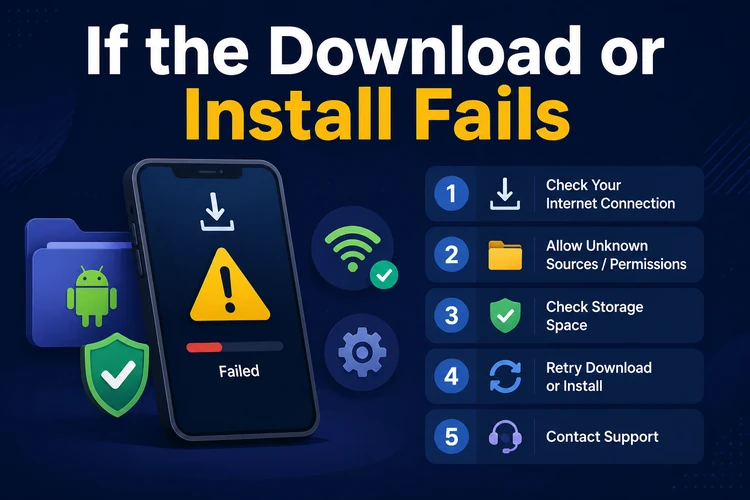
If the download never starts, switch between mobile data and Wi-Fi, then retry from the official source. If the file downloads but will not install, check whether the browser permission is still off and confirm that the download completed. If the app installs but closes on launch, restart the phone and try the current official file again. If the file has vanished, check the Downloads folder in the file manager or the download history in the browser used.
Low storage can also interrupt an installation even when the APK itself has downloaded. Remove only files you recognise, keep the APK until installation finishes, and avoid installing a second copy from an unknown source. If the problem continues, record the exact message shown by Android before contacting the operator through the available support channel.
FAQ
Open the official PrideSpins site in your phone browser and use the Android download option there. Save the file on the same phone you plan to install it on, then open it to start the installation.
Yes, the app is provided as an Android package that is installed from the downloaded file. Android may ask for permission to install from your browser the first time.
Get it only from the official PrideSpins source or a source the operator confirms. Avoid third-party catalogues and do not install modified or repackaged builds.
There is no charge stated for downloading and installing the app. Mobile data or Wi-Fi costs may still apply according to your network plan.
Check the app section of the official source and download the current file when an update is available. Install it over the existing app unless Android instructs you to remove the older version first.
Launch the app, choose the login option, and enter the phone number or email and password linked to your existing account. For a rejected password, use the login page's recovery process.